Okey, thanks! Been letting it run for an hour, did an ssh into umbrel, ran the command and got this:
CONTAINER ID IMAGE COMMAND CREATED STATUS PORTS NAMES
Hmm.. that output means the app has no containers right now, which is why nothing is progressing (there’s nothing left running to finish). Your blockchain data isn’t in the containers though, it’s on disk, so it should be fine. You can confirm it with:
sudo du -sh ~/umbrel/app-data/paulscode-knots-blake2b/data
To recover, reboot the Umbrel once. The stuck “updating” state is only held in memory, so a reboot should clear it, and the app should then show as stopped rather than updating. Start it from the app tile and it will rebuild its containers from your existing data.
If the tile still won’t start it, send me these two so I can see which umbrelOS layout you’re on:
ls ~/umbrel/scripts/app /opt/umbreld/source/modules/apps/legacy-compat/app-script 2>&1
docker ps -a | head
Output: 19G /home/umbrel/umbrel/app-data/paulscode-knots-blake2b/data
Rebooted and pressed the app tile, and it gets stuck at “Restarting…” for 10 min.
First command returned:
ls: cannot access ‘/home/umbrel/umbrel/scripts/app’: No such file or directory
/opt/umbreld/source/modules/apps/legacy-compat/app-script
Second returned:
permission denied while trying to connect to the Docker daemon socket at unix:///var/run/docker.sock: Get “http://%2Fvar%2Frun%2Fdocker.sock/v1.44/containers/json?all=1”: dial unix /var/run/docker.sock: connect: permission denied
Ok, did it sit on the “Restarting…” for more than 20 minutes, or eventually start? If it is still on Restarting… after 20 minutes, run these:
sudo docker ps -a --filter name=paulscode-knots-blake2b
And if that lists a container ending _app_1:
sudo docker logs --tail 30 paulscode-knots-blake2b_app_1
Thanks for responding! Yes, it’s still like that.
I don’t think there is a container like that:
CONTAINER ID IMAGE COMMAND CREATED STATUS PORTS NAMES
Ran the second one too but got an error msg:
Error response from daemon: No such container: paulscode-knots-blake2b_app_1
Ok, I think I have found the problem and fixed it. Since your’s is stuck in starting, you will have to apply the patch manually (since the UI won’t offer the update when it is in that state). SSH in and run this:
curl -fsSL https://raw.githubusercontent.com/paulscode/umbrel-store/master/paulscode-knots-blake2b/exports.sh -o /tmp/exports.sh && grep -q urlsafe_b64encode /tmp/exports.sh && cp /tmp/exports.sh ~/umbrel/app-data/paulscode-knots-blake2b/exports.sh && echo "OK - now reboot"
Hmmm I ran it and got “OK - now reboot” but nothing seems to be changed.. Should I maybe reboot Umbrel and try again? EDIT: I’ll leave it for now, maybe it’s working in the background. Thanks Paul!
1 Like
You need to reboot the umbrel for it to take effect.
Rebooted. The App tile said “not running”, clicked it and now it seems to be the same “Restarting…”
Anything interesting in the logs?
I know these delays are annoying, but wait for another 20 minutes (it may now be past the first problem that I just fixed, and now stuck on the part that I mentioned earlier in the thread). If still “Restarting…” after 20 minutes, then ssh in and capture the output of this:
sudo docker ps -a --filter name=paulscode-knots-blake2b --format '{{.Names}} | {{.Status}} | {{.Label "com.docker.compose.config-hash"}}'
ps -eo etimes,args --no-headers | grep -E 'app-script|docker compose' | grep -v grep | cut -c1-120
sudo docker logs --tail 15 paulscode-knots-blake2b_app_1 2>&1 | tail -15
1 Like
Can’t attach the log file but here are some things that maybe stood out to me.. not sure, I’m not good at code.
paulscode-knots-blake2b_app_1 | [blocks] init error: Error: RPC getblockchaininfo: Loading block index… (code -28)
paulscode-knots-blake2b_app_1 | at Object.command (file:///app/dist/modules/bitcoind/rpc-client.js:27:19)
paulscode-knots-blake2b_app_1 | at process.processTicksAndRejections (node:internal/process/task_queues:95:5)
paulscode-knots-blake2b_app_1 | at async prime (file:///app/dist/modules/blocks/blocks.js:219:37)
Otherwise I see no errors. Looks good
EDIT: No problem, I’ll try that next. Thank you!
Another idea is (after the 20 minute wait) to reboot again, and this time, rather than Starting the service, see if there is an Update listed, and do that update (latest version should have this problem fixed, just trying to get out of the current bad state I got your app into).
1 Like
Yes there is a 1.1.4 update available. Okey I’ll do the ssh thing after the 20 min, then reboot, then try the update.
Output:
paulscode-knots-blake2b_i2pd_daemon_1 | Created | e6f7da5c8576ba0ddcf58b518b1f61d5f40fdf887ed8df7dbe32c27953c140f3
paulscode-knots-blake2b_app_proxy_1 | Up 22 minutes | e012f3415cc8ccbeb746d22a7db90c38e48f46895783dfb31052c9ab0878847c
paulscode-knots-blake2b_tor_1 | Up 22 minutes | 7b758a2176857f7aef0f546295532400827f91f22da142750ae84291834fe212
paulscode-knots-blake2b_app_1 | Up 22 minutes | be45ddc11c7178fd1f14140dc0ef6e56c0bcf535c12eb46e9db9c748bde9f3ad
[bitcoind] 2026-09-05T23:33:22Z [warning] ThreadRPCServer incorrect password attempt from 10.21.21.63:60940
[bitcoind] 2026-09-05T23:33:23Z [warning] ThreadRPCServer incorrect password attempt from 10.21.21.63:60950
[bitcoind] 2026-09-05T23:33:23Z [warning] ThreadRPCServer incorrect password attempt from 10.21.21.63:60956
[bitcoind] 2026-09-05T23:33:24Z [warning] ThreadRPCServer incorrect password attempt from 10.21.21.63:60962
[bitcoind] 2026-09-05T23:33:25Z [warning] ThreadRPCServer incorrect password attempt from 10.21.21.63:60976
[bitcoind] 2026-09-05T23:33:25Z [warning] ThreadRPCServer incorrect password attempt from 10.21.21.63:60986
[bitcoind] 2026-09-05T23:33:26Z [warning] ThreadRPCServer incorrect password attempt from 10.21.21.63:60988
[bitcoind] 2026-09-05T23:33:26Z [warning] ThreadRPCServer incorrect password attempt from 10.21.21.63:32768
[bitcoind] 2026-09-05T23:33:27Z [warning] ThreadRPCServer incorrect password attempt from 10.21.21.63:32778
[bitcoind] 2026-09-05T23:33:28Z [warning] ThreadRPCServer incorrect password attempt from 10.21.21.63:32786
[bitcoind] 2026-09-05T23:33:28Z [warning] ThreadRPCServer incorrect password attempt from 10.21.21.63:32792
[bitcoind] 2026-09-05T23:33:29Z [warning] ThreadRPCServer incorrect password attempt from 10.21.21.63:32808
[bitcoind] 2026-09-05T23:33:30Z [warning] ThreadRPCServer incorrect password attempt from 10.21.21.63:32822
[bitcoind] 2026-09-05T23:33:30Z [warning] ThreadRPCServer incorrect password attempt from 10.21.21.63:32826
[bitcoind] 2026-09-05T23:33:31Z [warning] ThreadRPCServer incorrect password attempt from 10.21.21.63:32828
Rebooted & Updated and that seems to be working!! Thank you for your help Paul, Amazing! 
1 Like
They work great, thanks! How could I send you some BLAKE2b sats?
Hi Paul & others,
Our connection is repared. AI gives an overview of the fix. Hopefully others will benefit from it:
DATUM Gateway on StartOS: miners could not connect to local Stratum port 23334
I ran into an issue while setting up DATUM Gateway with Bitcoin Knots and BLAKE2b PoW miners on StartOS. DATUM itself appeared healthy: Bitcoin Knots was connected, DATUM was receiving new blocks and creating Stratum jobs, and the dashboard reported that the Stratum server was available. However, every miner remained disconnected and DATUM continuously showed:
0 clients / 0.00 Th/s
Sent to 0 stratum clients
The miners themselves were known to work because they connected normally to external pools.
What turned out to be wrong
DATUM’s StartOS interface showed the local Stratum address as:
192.168.1.7:23334
So the miner was configured with:
stratum+tcp://192.168.1.7:23334
But testing from another machine on the LAN gave:
nc -vz 192.168.1.7 23334
Connection refused
Checking the StartOS host confirmed that nothing was listening on LAN port 23334:
sudo ss -lntp
However, after checking the internal StartOS/LXC network, we discovered that DATUM itself was listening correctly inside its container:
10.0.3.57:23334
Testing the containers showed:
OPEN: 10.0.3.57:23334
So the actual situation was:
Miner
  |
  v
192.168.1.7:23334     <-- CLOSED / not forwarded
  |
  X
  |
10.0.3.57:23334       <-- DATUM Stratum working correctly
In other words, DATUM wasn’t the problem and neither was the miner. The Stratum server was running inside the StartOS container, but its TCP port was not actually reachable from the LAN.
Temporary solution that proved the cause
We created a temporary TCP forward on the StartOS host using socat:
sudo socat TCP-LISTEN:23334,bind=192.168.1.7,reuseaddr,fork TCP:10.0.3.57:23334
Then from another computer:
nc -vz 192.168.1.7 23334
Immediately changed from:
Connection refused
to:
Connection to 192.168.1.7 port 23334 succeeded!
The miner was then configured with:
URL:        192.168.1.7:23334
Miner Name: SC_1
Password:   x
And the miner connected to DATUM successfully.
Conclusion
If DATUM Gateway on StartOS says the Stratum server is healthy but shows 0 clients, while miners cannot connect to the displayed LAN address, check whether StartOS is actually exposing the Stratum TCP port.
The important distinction is:
DATUM Stratum server running     ✅
DATUM receiving Bitcoin jobs     ✅
Bitcoin Knots dependency         ✅
Miner                            ✅
Internal container :23334        ✅
StartOS LAN :23334               ❌
A temporary socat forward confirmed that the missing LAN-to-container TCP forwarding was the issue.
Important: the socat command above is only a diagnostic/temporary workaround. It stops when the process or server stops. The proper next step is to determine why the StartOS package/interface advertises 192.168.1.7:23334 while that port is not actually being published, and implement a persistent solution.
Hopefully this saves someone else from spending hours changing miner, DATUM, Knots, BLAKE2b or pool settings when the real problem is simply that the miner cannot reach the DATUM Stratum socket through the StartOS host.
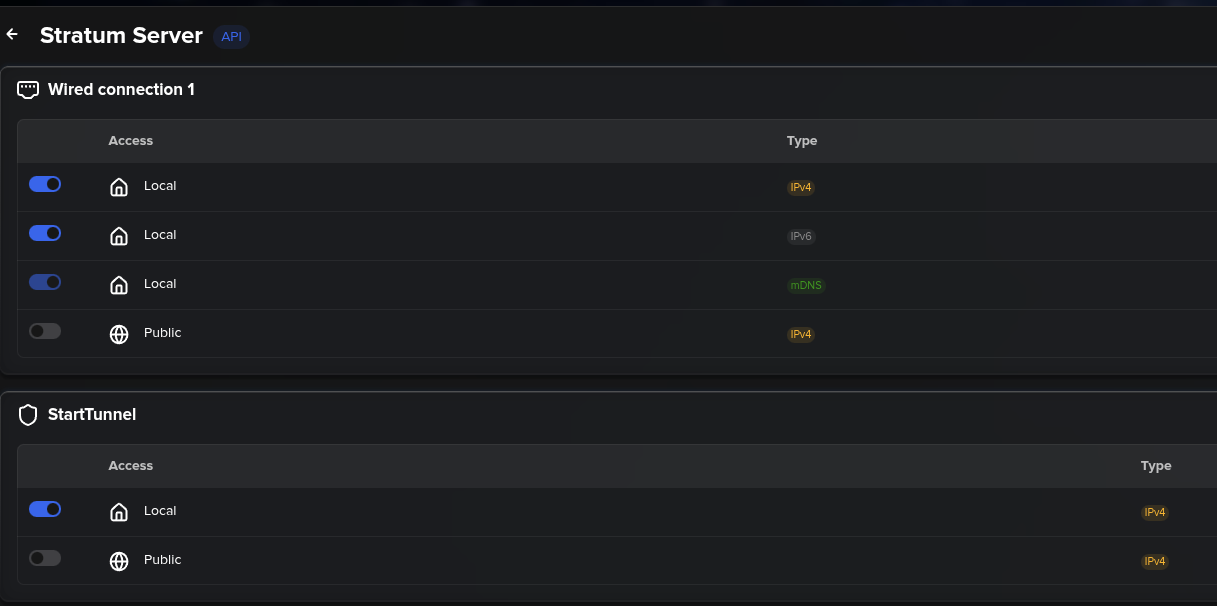
Weird. I wonder what the root cause there is though. Sounds like a bug in StartOS network routing (I haven’t run into that myself). If you go to the Interfaces > Stratum Server section, do the radio buttons match this, or do you see any differences (either in which options are listed, or in which radio buttons are flipped on/off)?
I have everything I need but it seems every app store doesn’t have knots blake2b for umbrel home server ,the official umbrel store seems to be missing. I don’t like looking at my miner I got and can’t make a move