To help support our side of the spam war, if anyone needs technical assistance with leveraging Braiins Hashpower to mine BIP110-signaling blocks, I am offering up to an hour of my time per member for free to help anyone get started. This can also include help with setting up a server (or virtual machine if you don’t have a separate device to use as a server), installing Knots + BIP110, configuring Datum Gateway on the current version of StartOS, configuring Ocean for Lightning payouts, setting up DuckDNS if your IP address isn’t static, etc. I can set up virtual meetings where you are able to share your screen and I walk you through the process.
9 Likes
A gentlemen and a scholar.
EDIT: I’ve been renting hashpower from Braiins since late January. The biggest stumbling block appears to be Compliance Reviews. Apparently UTXO’s are being flagged. I’ve made sure to send the entire UTXO for funding but that doesn’t seem to always cure the issue. I have had 2 compliance reviews : March 28th and April 7th
Braiins is a little slow in reviewing the Compliance (should be 48 hrs during working days only - no weekends) but the one on April 7th has still not been returned. Just thought I’d share.
2 Likes
Massive Respect Paul
I’ve been trying to set up a Google Cloud VPN (a tiny free version running Debian 13) with StartTunnel, but ended up not being able to connect to my headless Start9 box (a Trigkey N100 mini-pc) so had to connect it to a monitor, keyboard and mouse to fix it 
Anyway, had a long chat/argument with ChatGPT this morning about the best way to connect Braiins hash rate to the Datum gateway on the Start 9 box (which lives on my LAN connected to the WAN by a dynamic public IP) It reckoned that Start Tunnel was not a good idea citing excessive latency (so lots of stale shares) but to have Wireguard installed instead on the Google VPS
 What you are building (in one line)
You are creating a:
WireGuard tunnel between your Google Cloud VM (public entry point) and your StartOS box (home network) so Braiins/ASIC traffic can reach your Datum safely.
⸻
 The simple architecture
ASIC (Braiins)
↓
Internet
↓
Google Cloud VM (WireGuard SERVER)
↓ VPN tunnel
StartOS (WireGuard CLIENT at home)
↓
Datum (on your LAN)
⸻
 What you actually do (3 steps)
 Google Cloud VM = SERVER
You:
• Install WireGuard
• Open UDP port 51820
• Add a config with:
• VM IP = 10.10.0.1
• StartOS allowed peer = 10.10.0.2
• Enable IP forwarding + NAT
 This VM becomes your fixed public gateway
⸻
 StartOS = CLIENT (built-in WireGuard)
In StartOS WireGuard UI:
You set:
• IP = 10.10.0.2
• Connect to VM public IP
• Keep connection alive (PersistentKeepalive = 25)
• Allow VPN subnet (10.10.0.0/24)
This makes your home network dial out to the cloud
⸻
 Routing to your Datum
Now traffic must reach Datum:
You do ONE of these:
Option A (simplest)
• Point Braiins directly to:
10.10.0.2:
⸻
Option B (cleaner)
• Point Braiins to VM public IP
• VM forwards traffic through VPN to StartOS
⸻
 Key idea (very important)
 StartOS connects OUT to cloud VM
No need for dynamic IP fixes at home
VM becomes your stable “front door”
VPN carries traffic back into your LAN
⸻
 What you are NOT using
•  StartTunnel (not needed)
• Port forwarding at home
• Complex ISP workarounds
⸻
 Why this works well for you
• Stable public IP (VM)
• Works with dynamic home IP
• Low latency enough for mining
• Clean separation of WAN and LAN
• Fully controlled routing
⸻
 If you remember only this:
Cloud VM = public entry point
StartOS = home gateway into Datum
WireGuard = the bridge between them
I have StartOS v0.4.0 beta 5 running on the TrigKey. Later on I’ll try ChatGPTs method and see if it works, without somehow losing the Start9 box again!  (Knots with BIP-110 of course
  )
)
1 Like
Haha, the LLM must be smoking something.. how is Braiins supposed to connect “directly to” an internal IP address? If that were possible, then you could point Braiins “directly to” your Start9 server’s internal IP address on your home network and skip that pesky VPS 
Did it cite some real reports? This seems odd considering that 0.4.0 isn’t being widely used yet. I suspect this is just a hallucination, but I suppose it could be true if it is backed up by real world examples of folks seeing such latency.
This would be the correct option when using the VPS.
Another option for dynamic public IP addresses is DuckDNS (also free). The idea is that you create a subdomain on DuckDNS (something like foubar.duckdns.org) and set up a cron that runs every 5 minutes, for example) which hits the DuckDNS API to update your IP address. Then you point Braiins to the DuckDNS address (which routes it to your current IP address). When your public IP address gets rotated, the cron updates DuckDNS, and the longest Braiins would be unable to reach your server would be 5 minutes.
2 Likes
Yes, ChatGPT does seems to be having a moment. Re duckdns, that’s how I run my Jellyfin server (on a Raspberry Pi), so I think I’ll try that route - plugging in my BitAxe via my phones mobile hot spot so as to simulate Braiins. At least I can then check it all actually works before spending lots of btc for Braiins hash rate. The question is, which has the lowest latency, duckdns or similar, or the Google Cloud VPN? I’m in England, so those little packets will have to swim across the Atlantic to Wyoming.
1 Like
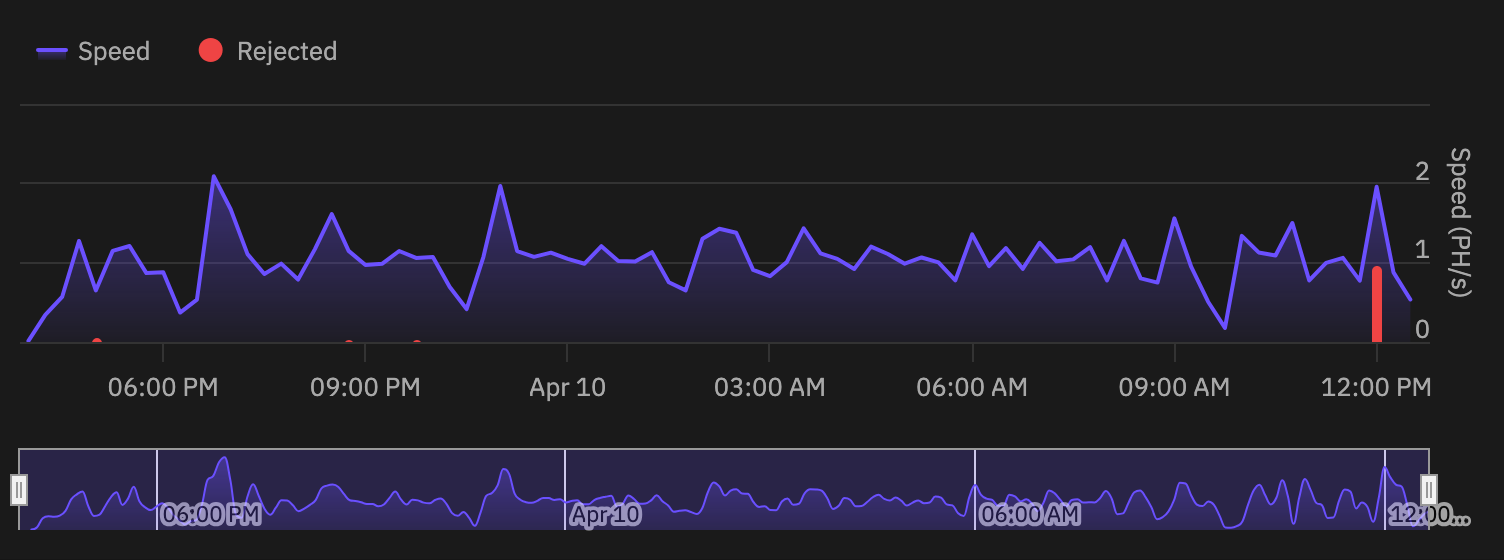
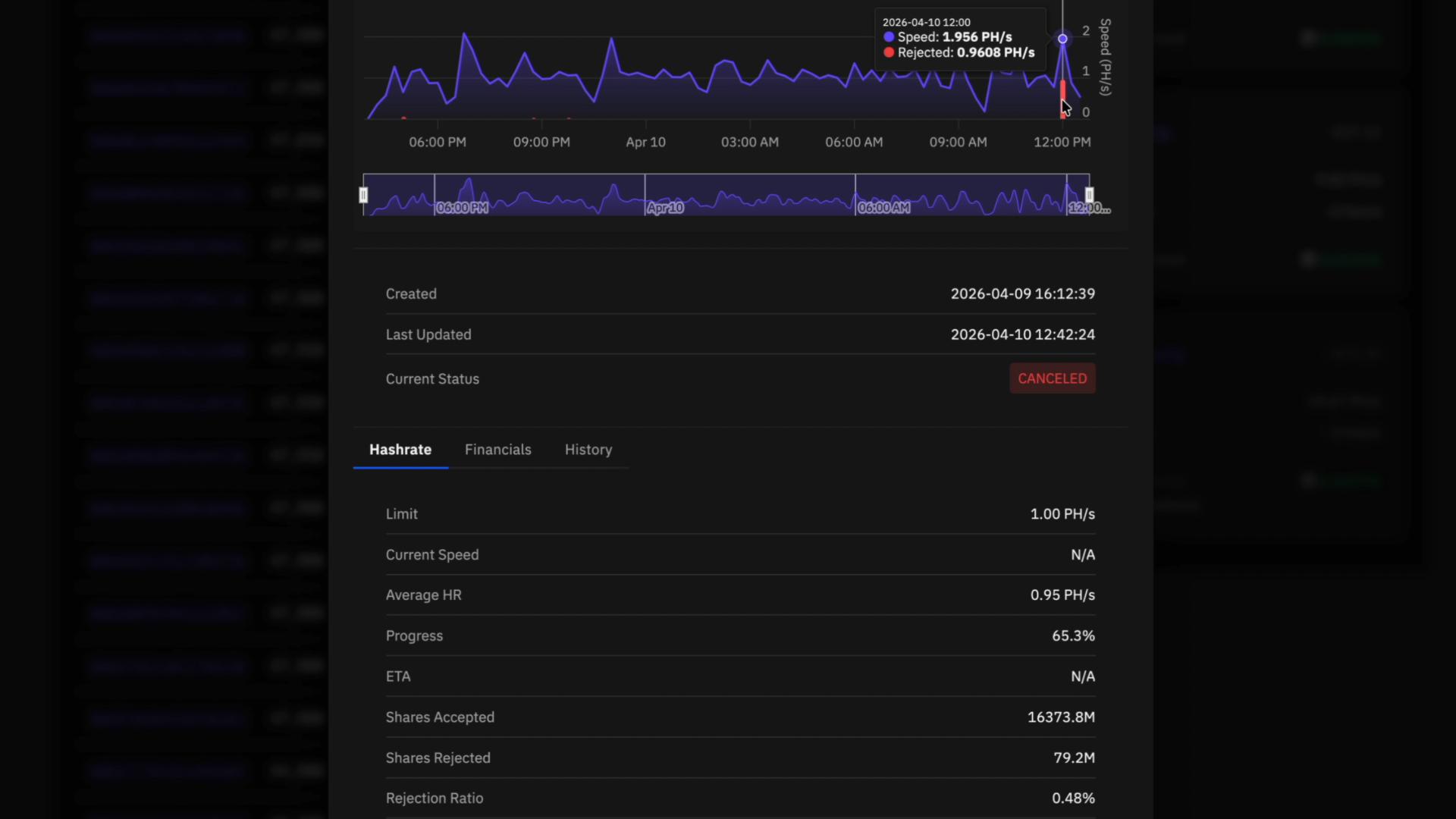
I wonder what the threshold is for time outs is though? I have had 2 orders cancelled due to rejections. Rejection ratio was 0.48% with the associated screen grab.
Greg, is that rejected shares? 0.48% seems pretty low.
Actually yes.
Shares Accepted 16373.8M
Shares Rejected 79.2M
Rejection Ratio 0.48%
BUT - After reviewing the large red bar on the right it appears to indicates a PH/s drop…so it looks like there is no way to deduce from their graph what actually caused the cancellation other than just loosing touch with the IP completely.
Crontab can be increased from every 5 minutes to every minute by changing */5 * * * * to * * * * *). You can also go even more granulare by multiple minutely rules that have a gradient delay at the beginning of them. So we could dial the schedule in to whatever granularity we need. The challenge will be figuring out what the target should be (would be trial and error, since I don’t think that is published anywhere)
I’m not sure. I think we’d need to run some benchmarks to see. The VPN setup is inherently more complex, but Google also has really solid hardware and infrastructure. If I were to guess, probably Google would be lower latency just based on that last point, but that is purely a guess.
1 Like
Just info to add to this thread:
At times you will get an message when you try and create an order that the pool has been “blacklisted”. This is a temp ban ranging from 12-24 hours. This has happened at least a 1/2 dozen times with OCEAN over the past 2 months.
Their FAQ pages describes how to check and see if the pool meets their criteria.
- Pool must support Stratum protocol
- Pool must have
extranonce2_sizeof at least 7 - Pool URL format:
stratum+tcp://pool.example.com:port
How to check the pools. FAQ's: Basics – Braiins Academy
OCEAN returns “8” but still gets blacklisted on occasion (last night)
1 Like
Thanks Greg. I note OCEAN is listed as compatible.
Thank you very much Paul for making yourself available to us plebs. I am running knots + BIP110 on two separate laptops but not using startOS, is this a must or can I use datum gateway without it? thanks
Yes, you should be able to run Datum Gateway. What operating system(s) are on the laptops?
Linux mint on both! Thanks for getting back to me Paul.
What are the specs on the laptops? A couple of “thinking outside the box” options we could also explore if you like (simpler in the long run if the specs support it) are:
- Running StartOS in a VM on one of the laptops
- Replacing Linux Mint on one of the laptops with Proxmox and installing StartOS in that
- Replacing Linux Mint on one of the laptops with StartOS directly (if supported)
If you want to explore any of those options, let me know. Otherwise, Datum Gateway can be run on Linux Mint directly (the setup is just a bit technical). A couple of questions if you want to go this route:
- Does your ISP give you a static IP address, or does it change periodically? (for most folks, it is the latter – we can assume that if you are not sure)
- Are you able to find the information needed to log into your router? (to set up port forwarding – if not, setting up a tunnel via a VPS or Playit.gg would be necessary)
- Do your laptops connect to the internet over a VPN? (same point about a tunnel, if so)
If we can set it up without needing a tunnel, then installing Datum Gateway on the laptop directly should be pretty straight forward. If a tunnel is required, I can also help you out with that, but getting StartOS running would be a lot simpler if that is an option. Give the options some thought, and let me know which route you want to try first.
option 1 sounds like the best options for me but will I need download bitcoin again or can I use existing? 1st laptop is a lenovo 16 ram 500 hd with external SSD with the bitcoin knots on it and the 2nd laptop is a dell 8 rma 250 hd with external SSD with bitcoin knots on it.
This component (in conjunction with the lower RAM profile) will make running the IBD again a painful option (even the 16GB RAM system will require a lot of file I/O, which will make the IBD take a very long time).
In this case, I think it will probably be preferable (unless you are comfortable with waiting a very long time to re-sync the blockchain) to run Datum Gateway on Linux Mint rather than running StartOS. But whether that is the best option will probably depend on the answer to the network-related questions:
- Does your ISP give you a static IP address, or does it change periodically? (we can assume it changes if you are not sure)
- Are you able to find the information needed to log into your router settings? (some routers may come with an app, but most are configured via your browser)
- Do your laptops connect to the internet over a VPN?
Not sure about the static IP address but yes I can login to my router via the browser and yes I’m using VPN on my laptops.