Has anybody run into the BIOS loop issue from 2025 with the recent Start OS 0.4.0 update?
I have a Minisforum UN1265 that I had trouble with when I installed Start OS 0.3.5.1 last year.
Paul had posted on the Start9 community page some instructions for hacking the bootloader at /EFI/BOOT/BOOTX64.EFI for the Minisforum UN1290 machines.
I followed the instructions and it worked great on my UN1265…
Friday, I installed the the update to Start OS 0.4.0
I followed all the instructions. It installed, migrated data, took me to the red matrix screen at the end. Then asked me to remove the bootable USB drive, and restart.
Then… it booted to the BIOS.
Every time I start this machine it boots straight to the BIOS screen.
Should I try the instructions from 2025 again on this Minisforum because it has the qwerky BIOS?
In theory, the same process should work. However, see this post here (Cadd noticed one slight difference with a fresh install of 0.4.0). That would complicate the update path if it hold true there as well, since you will already have rebooted. Let me know if the problem persists, and we can try and dig into it further.
To avoid potentially making a mess of the boot files by operating blindly, I would start with these commands before running the process (boot into your Linux USB first, and open a terminal):
sudo mount /dev/nvme0n1p1 /mnt
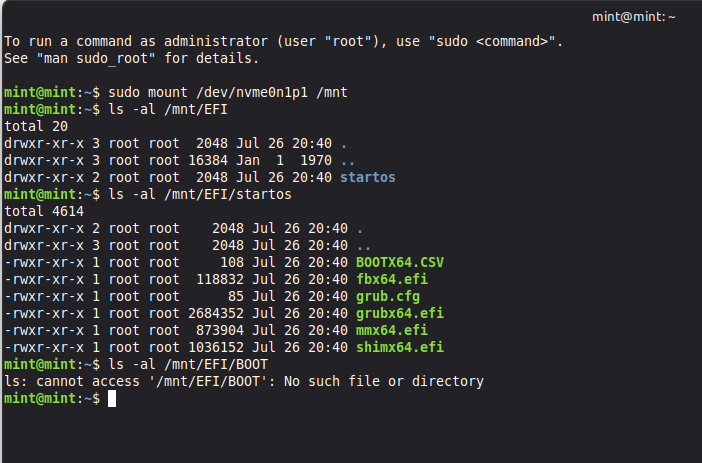
Then capture the output from this command (paste a screenshot if you aren’t able to log into the forum from Linux to copy/paste):
ls -al /mnt/EFI
And capture the output of this command:
ls -al /mnt/EFI/startos
And finally, capture the output of this command:
ls -al /mnt/EFI/BOOT
If everything is as that earlier process expects:
The first command should include a line for “startos” in the output.
The second command should include lines for “shimx64.efi”, “mmx64.efi”, “grubx64.efi”, and “grub.cfg”
The third command should not find any results
If things are arranged differently, then I’ll see if I can adjust the process to match. Unfortunately I am using my UN1290 (which is the only one I own that has the problem) as my main PC in my recording studio now, so I don’t have a system available to test the process on anymore without tearing that one down to test with it.
Yes, I think the 0.4.0 upgrade just re-created the boot partition (which undid the earlier changes you made after installing 0.3.5.1). It looks familiar. The only ones that I don’t recall are the"fbx64.efi" and “BOOTX64.CSV” files (but it has been a long time, so that isn’t surprising). I’d say go ahead and run the original process again (it can always be undone, since it doesn’t delete anything). If it still doesn’t boot up into StartOS after that, then go ahead and boot from the Linux USB again and run the same commands to see how things are arranged after running the process and attempting to boot.
I tried installing 0.4.0 and when it said remove stick after install I pressed the power button to turn it off.
Then put Ubuntu on a usb and pulled up the terminal and copied and pasted the 4 lines of code in order and got the correct corresponding commands but after that I just pull the usb and and turn it off right? Or should it hit meter after the last command? It’s pulling up the damn bios screen again
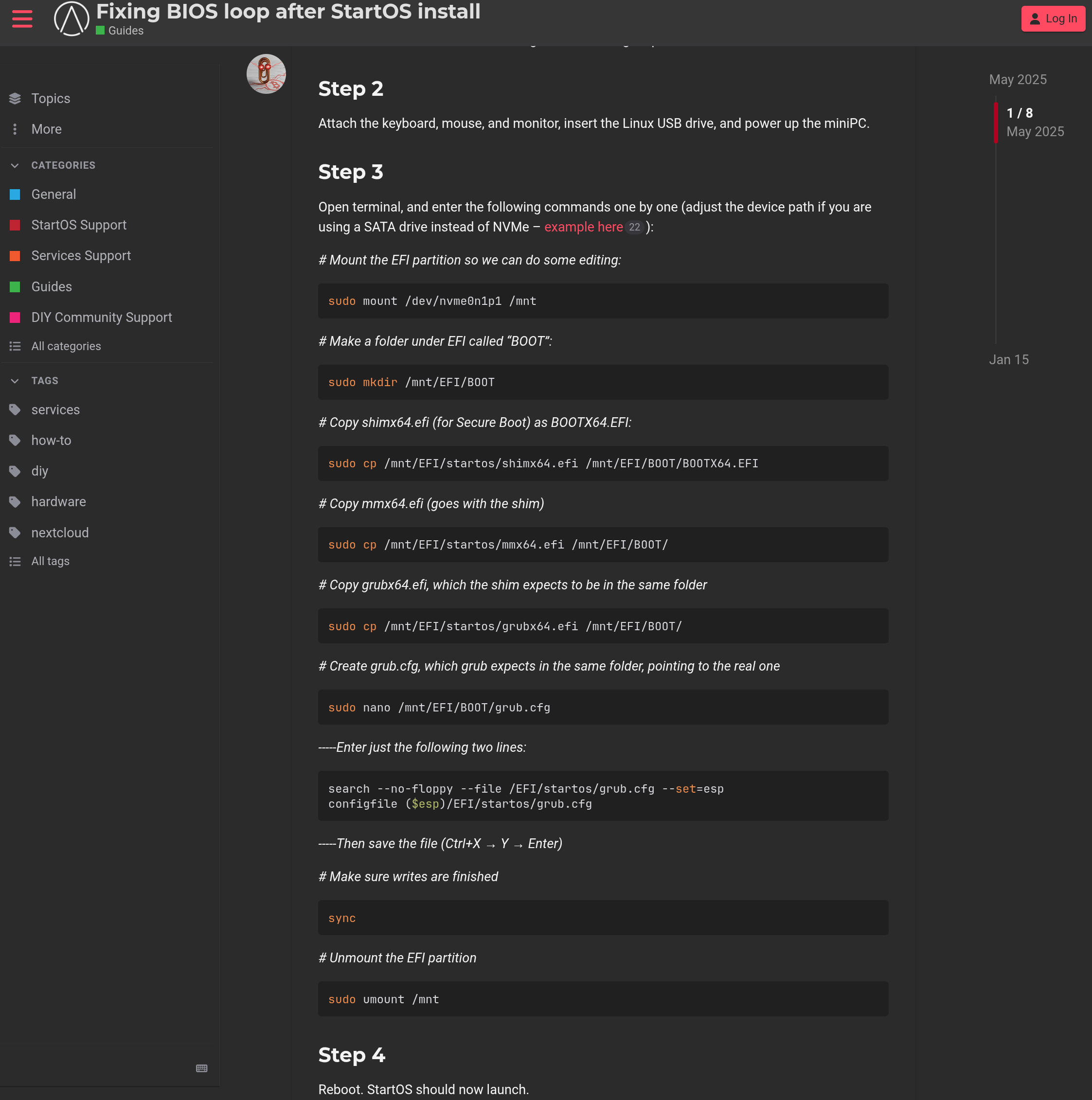
It is actually 8 commands that you need to run, not the 4 listed earlier in this thread (that was for diagnosing LID’s system to make sure it matches what we were expecting). The commands you need to run are mentioned over in this other thread here.
Also, once you finish with the 8 commands, you can Shut Down through the applications menu (rather than doing a hard power-off), and it should instruct you when to remove the USB (if not, just remove it when the system is fully powered off). Once the Linux USB is removed, go ahead and power back on and it should load StartOS.