Based on your description, I assume the miniPC wasn’t down for a super long time (years, etc), so one wouldn’t expect the IBD to have become that much more difficult since the first time you ran it when it worked, correct?
Without more detail, my initial thoughts go to the I/O speed of the new external SSD being much lower than the original you replaced, coupled with low system RAM and/or earlier-gen RAM (so that it is having to do a lot of file-swapping over a slow physical interface with the drive).
Could you describe what you know about the full hardware stack (don’t need all these details, but they can help with ruling out certain hypotheses)?
The minPC model
The amount of RAM
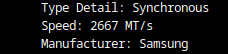
RAM speed (2133 MT/s vs 3200 MT/s, etc)
If the device has a small internal drive
If so, what type and connection (spinning disk via SATA, NVMe via M.2, etc)
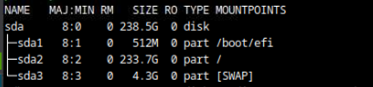
The operating system, and what drive it is installed on
The specific model of external SSD
The USB port gen (2.x black port vs 3.x blue port)
Any tweaks you may have added while trying to optimize
In this case, installing Start9 (while simplest from a UI/UX perspective) may not be the best option since you will have less flexibility to tweak things at a low level, such as memory swap size and location. I would recommend a Debian-based Linux distro (Ubuntu, Mint, Zorin, Armbian, Raspbian, etc.) until we can figure out what is causing the slowness and what the resolution involves. The resolution will determine if Start9 is a good fit (and if it is, we can do the switch over at that time, otherwise stay on Linux)
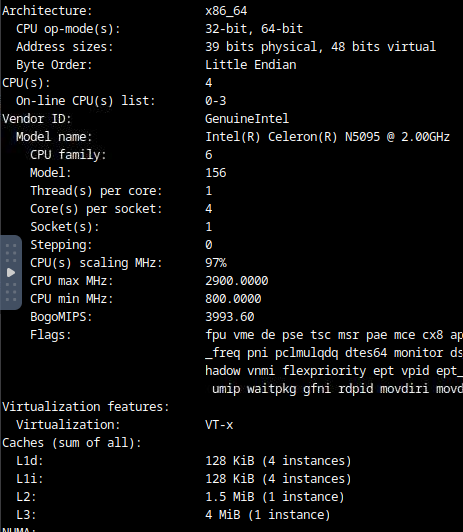
Thanks for getting back to me Paul. The miniPC wasnt down at all, only the external SSD was not connected for a day or so. So when I remounted it, it would sync slow and wouldnt get to fully synced. As mentioned I believed that the external SSD (call it SSD A) was faulty. So I purchased another SSD (SSD B) but after the initial 60% IBD it started to slow significantly. I have since added back the old external SSD A to see if it makes a difference but that one sync’s slowly as before and is currently at 98.8% with a new block every 4 to 8 minutes. Therefore it seems that both external SSD’s are updating slowly. I have gathered the following information on the hardware stack, I hope this helps, if not let me know what else you would need. cheers
As long as it takes on average less than 10 minutes per block validation, it can keep up with new blocks and stay synced with the network, and everything will appear to be perfectly fine. The problem with a low block validation rate like this is if you have any significant down time or need to resync, while it will technically catch up eventually, in practical terms it may not be realistic at all.
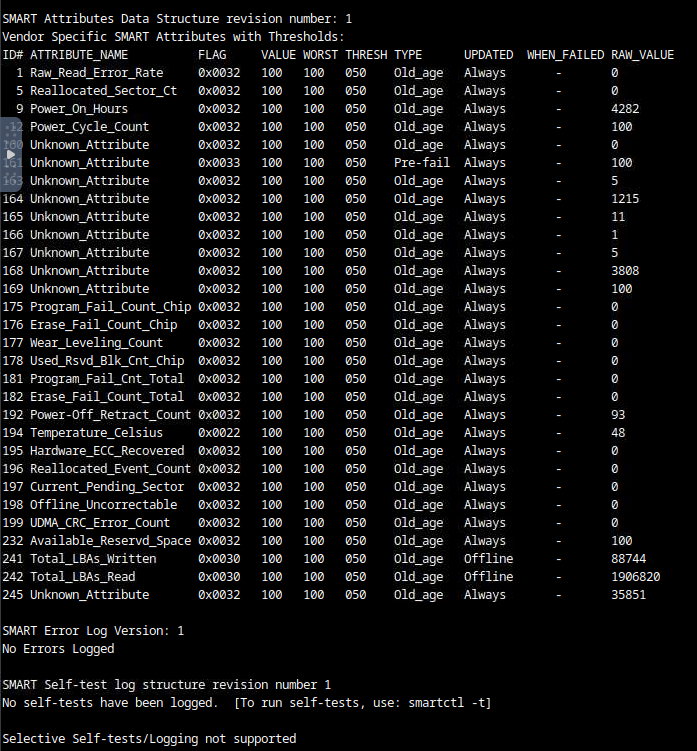
I see that it has a 256GB internal disk (presuably connected via SATA connector since it shows as “sda”). Is that one an SSD or an HDD? Your swap space is on this drive (/dev/sda3), so it could be a potential bottleneck depending on the tech.
This aligns with my experience as well – I think around this percentage is where the UTXO set growth starts to kick in and have a big impact on low-RAM nodes.
Based on what you’ve posted, there are a combination of factors that could potentially be slowing the IBD:
Low RAM
When below 16 GB you start to see significantly more file swapping
Low swap speed
That internal drive is SATA. Even a SATA SSD is much slower I/O than NVMe, but if it is an HDD then this is likely a significant bottleneck
Low file I/O speed with blockchain DB
It helps that it is connected over the blue port, but USB in general is a bottleneck
My theory is that at a certain point in the growth of the UTXO set, your system has slowed in its ability to validate new blocks to somewhere around 5 minutes per block. It would have run perfectly fine at this speed as long as there wasn’t any significant disruption, since blocks are mined at an average rate of 10 minutes per block. When the SSD was kicked off, it fell behind for however long it was between that event and when Knots was later restarted after the SSD plugged back in (allowing it to resume block validations).
Catching up on the original SSD is probably your best “no upgrades” option. It will likely take around half as long to complete as the number of days since it was unplugged minus the number of days it was syncing before you switched to the new SSD. Syncing the new SSD is probably not a practical option (could take months or over a year to catch up, depending on when the ~5 minutes per block validation kicks in)
Upgrade options are:
If the internal SATA drive is an HDD, swapping it out for a small SSD (and cloning the drive or at least copying over Knots with the same version and config, otherwise not a good option since you’d have to repeat the IBD!) would speed up the swap speed and likely increase the validation rate per block
Adding another 8GB of RAM would significantly reduce the amount of file swapping, and likely increase the validation rate per block
Switching to StartOS and/or using the new external SSD are probably not good options without also doing one or both of the upgrades I mentioned, since they require re-running the entire IBD (which as you have seen is way too slow on your current specs).
Another thing you could try (though I’ve had limited success myself with this type of tweaking) is to actually reduce the dbcache a bit (which seems counterintuitive). The idea is if the OS and Knots itself plus anything else that could be running on the device require enough of the RAM that the dbcache can’t fit, this could actually increase the amount of file swapping rather than limiting it. You could capture a benchmark at the current settings, then move it down to somewhere in the range of 3000–3500 and re-assess to see if it had any measureable impact (and if so, did it improve, or make things worse).
thanks for the thorough assessment Paul, really appreciate it. Indeed it looks like I will need to make some upgrades, starting with replacing the 8GB with 16GB.
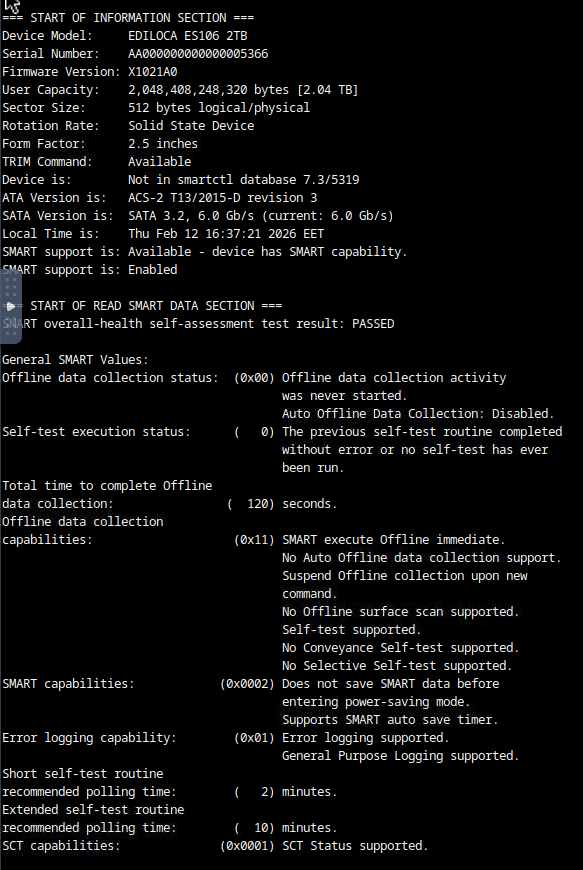
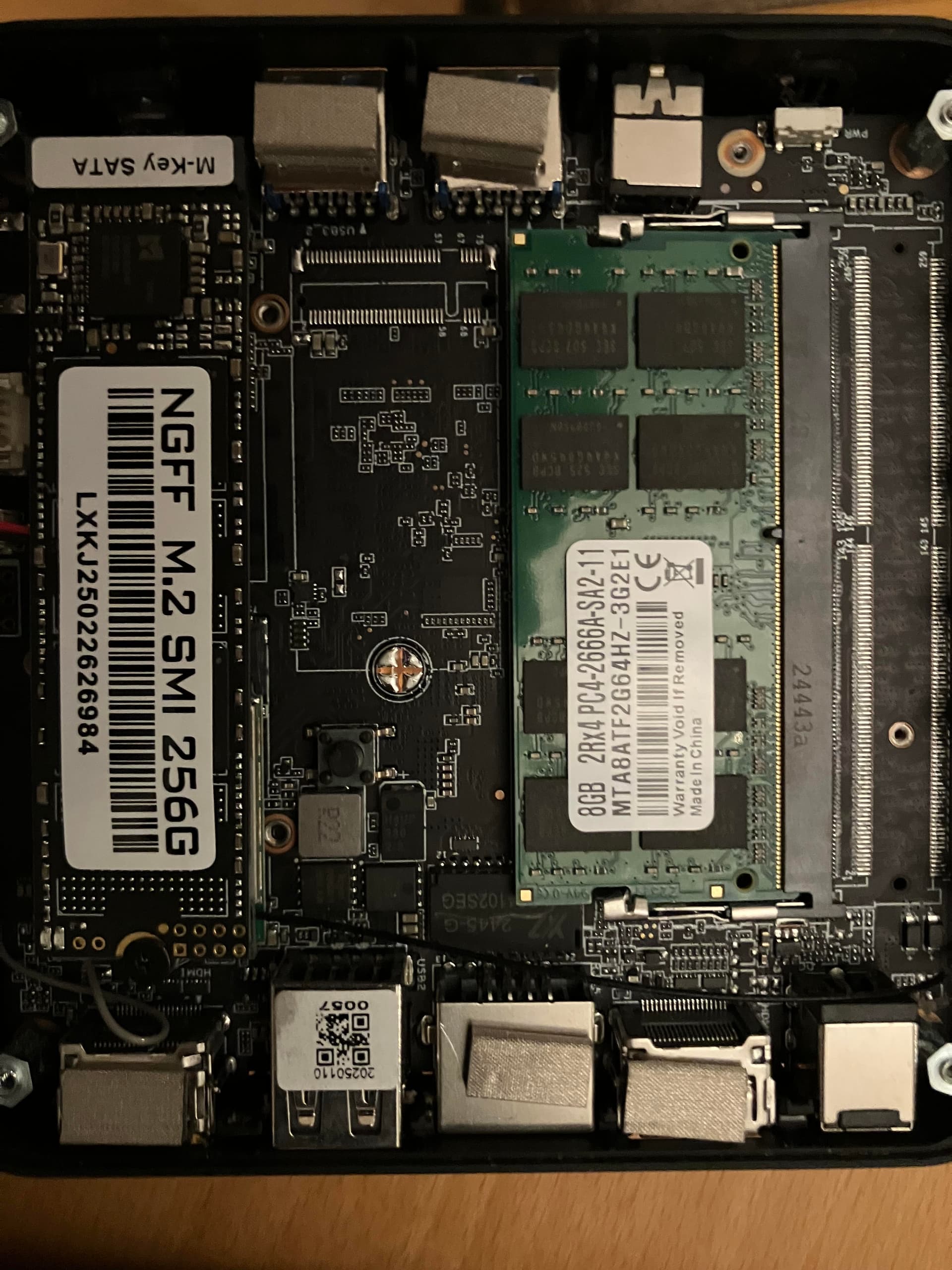
I have opened her up to get a better understanding of whether its a SSD or HDD. From what I can tell its a SSD and from what I have read the socket wont allow NVME but please take a look below.
Regarding the low I/O speed using USB, I assume there is nothing I can do about it right?
Yes, the internal SSD should be good. It is SATA, but doesn’t support NVMe so can’t go any faster than what you have. Too bad it has only one RAM slot.
If you’re not in a hurry to upgrade the RAM, I have a 16GB DDR4 2666 stick that I’ll send you if you DM me your shipping address. I can’t sell it because it is an A-Tech model that doesn’t work in a lot of mini PCs (and I don’t want the bad eBay review if it doesn’t work for the person who buys it). If it doesn’t work on your miniPC then you’d only be out the time.
Yes, for the external USB SSD drive, not much you can do for that. The only way to speed up file IO from that regard would be to upgrade the internal M.2 SATA to 2 TB (which would run you ~$180 - $200, so not a cheap upgrade)
thanks for the offer Paul however I’m in Greece the shipping and customs alone will kill me. I’ll make the 16GB upgrade and if I don’t see any significant changes I may repurpose the miniPC and find a more capable device for running Bitcoin related software.